After obsessing over typographical details in my theory papers for over 10 years, I am distilling my tricks for anyone else who might like a hand making their papers look pretty. I occasionally reference some Mac-specific things, but I’m certain there are analogous tricks for Windows machines.
Unicode
First of all, you should know that there are several useful music symbols available as Unicode. Unicode for all practical purposes means “you can use this character anytime, anywhere, in any font (that has provided glyphs for the character).” They’re characters just like the letters on your keyboard, but they require special codes to enter. Or, you can just copy-paste them.
Here are a handful of music-related Unicode characters that you should know about. You can keep them saved in a document on your desktop, or just google it whenever you need them, and then copy-paste the symbol into whatever you’re writing.
♭ ♯ ♮ 𝄪 𝄫
There’s actually a lot more than this—note values, carets for scale degrees, repeat signs, and more—but the more niche you get, the less likely it is that your font will support it. I really recommend using GNU FreeFont because it looks good and accommodates tons of music symbols. Google Fonts also makes Noto Music, which is a good web option (used on this website!).
To find these symbols easily, I’ve saved a reference spreadsheet on my computer with all of the Unicode I might use for music.
Download (.numbers) Download (.xlsx)
Autocorrect: the lazy writer’s best friend
“Yeah, I know I could use Unicode symbols for sharps and flats,” you say, “but I’m just too lazy to look up the codes or copy paste them every time.”
Me too! Instead, I’ve programmed my sharps, flats, and natural signs to be replaced by Auto-Correct every time I type a certain sequence of keys.
Global autocorrect
If you want to be able to use these symbols quickly in any app, you can make this a global autocorrect setting throughout OSX. Go to System Preferences → Keyboard → Text, and you’ll see a table of custom text replacements. Here are the ones I use for accidentals:
| Replace | With |
|---|---|
| !b | ♭ |
| !# | ♯ |
| !n | ♮ |
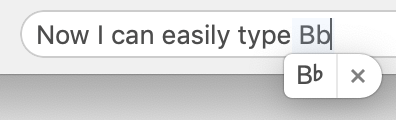
Add those replacements, and then all you need to do is type that shortcut and your computer will replace it with nice pretty flat sign, sharp sign, or natural sign. B!b becomes B♭. No more placeholder ‘b’s and ‘#’s!
App-specific autocorrect
Word processing apps like Pages (MacOS) and Microsoft Word also have their own autocorrect dictionaries, so you can also add these text replacements there. They will then only work in that app.
Chord symbols and figures
You can also achieve these things by installing custom fonts, an option I’ll discuss further below.
Chord quality symbols can be quickly typed with a combination of alternate characters and superscript.
| Quality | Symbol | Keyboard shortcut |
|---|---|---|
| major 7 (jazz) | ∆ | ⌥J and add superscript |
| diminished 7 | º | ⌥0 (no need for superscript) |
| half-diminished 7 | ø | ⌥O and add superscript |
A single figure is also easily achieved with superscript, as in V4–3.
But things get trickier when you need multiple rows of figures, for example, to show a cadential 6/4—for that, we need to start using tools for displaying mathematical equations.
LaTeX/MathJax (Web interfaces, Pages app)
LaTeX is a super flexible tool that I honestly don’t even fully understand. MathJax is derived from LaTeX and allows display of LaTeX math equations on web browsers.
This may sound intimidating, but really, we don’t need to fully understand LaTeX in order to use it to display music theory symbols. I’m going to give you templates to copy-paste into LaTeX to generate Roman numerals with figures and scale-degree carats.
You can use MathJax in a lot of places: on the web (on this website, for example, and on Open Music Theory) and in word procsesors like Pages (MacOS) and Microsoft Word. Of course, if you’re hardcore, you use LaTeX
Anyway, here’s what you want—templates for typing music stuff.
| for | use LaTeX code | renders as |
|---|---|---|
| scale degrees | \hat{x} |
$ \hat{x} $ |
| accidentals | \flat\sharp\natural |
$\flat\sharp\natural$ |
| figures |
^x_y ^{x1-x2}_{y1-y2}
|
$^x_y$ $^{x1-x2}_{y1-y2}$ |
To insert these equations in Pages (MacOS) or Microsoft Word, go to Insert > Equation. There, you can enter the LaTeX formulas above.
Sometimes I’ll write prompts on tests/quizzes in LaTeX, which just requires a little bit more effort, but pays off in beauty! The web display below has some wonkiness with the letters being offset, but this doesn’t happen in word processors.
| LaTeX code | rendered |
|---|---|
\mathrm{C\sharp\ minor:\ V^4_3} |
$\mathrm{C\sharp\ minor:\ V^4_3}$ |
(The \mathrm{} part makes the text regular instead of italic, an escape character \ is necessary before any space you want to actually render, and the rest is basically self-explanatory.)
Another great thing about LaTeX is that it’s widely used in the sciences, which means there are a ton of people around who are very fluent in making things happen with LaTeX. Posting and asking for help on a forum or other social media is likely to get you a quick response.
Specialized fonts
The above solutions are cool because they should work across platforms, but sometimes a special font is just the trick to get the job done.
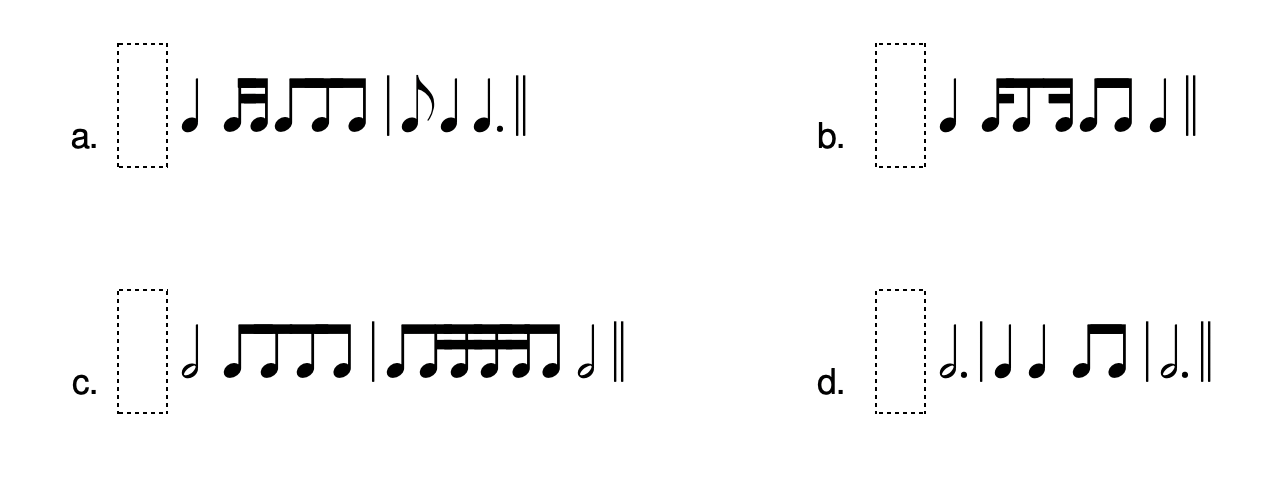
I recommend the free fonts provided by Matthew Hindson on his website. I’ve been using them for years, especially the Staff Clef Pitches Easy and the Rhythms font, both of which I find extremely useful for making quizzes and tests. He also provides key maps for all his fonts, so it’s easy to learn how to use them.

More questions?
If you have other music theory problems you need to solve in your word processing adventures, email me—I might have another trick to share. And I’ll keep updating this post as I think of new tricks.